Hyperlocal Landing Pages That Do Not Look Like Doorway Pages: A Template for Service Businesses
Picture this. A plumber in Ohio builds forty city pages in one weekend. Same photo. Same three paragraphs. Only the city name changes. Three months later, every one of those pages is gone from Google. Not penalized in some dramatic public way. Just quietly buried.
This occurs with HVAC & plumbing businesses every day. Everyone wants to rank in every town that they serve. The HVAC & plumbing business copies and pastes the same page, then swaps the city name. Google calls this doorway abuse, customers find this annoying, and it rarely works for long.
The good news is that hyperlocal landing pages are not the problem. The problem is thin, duplicate, copy-paste pages. A hyperlocal page done the right way will rank, convert, and establish trust in a specific town or neighborhood. This guide will explain how to create hyperlocal pages done the right way to appear to be a legitimate local resource as opposed to a spam template that substitutes city names.
What Hyperlocal Landing Pages Actually Are
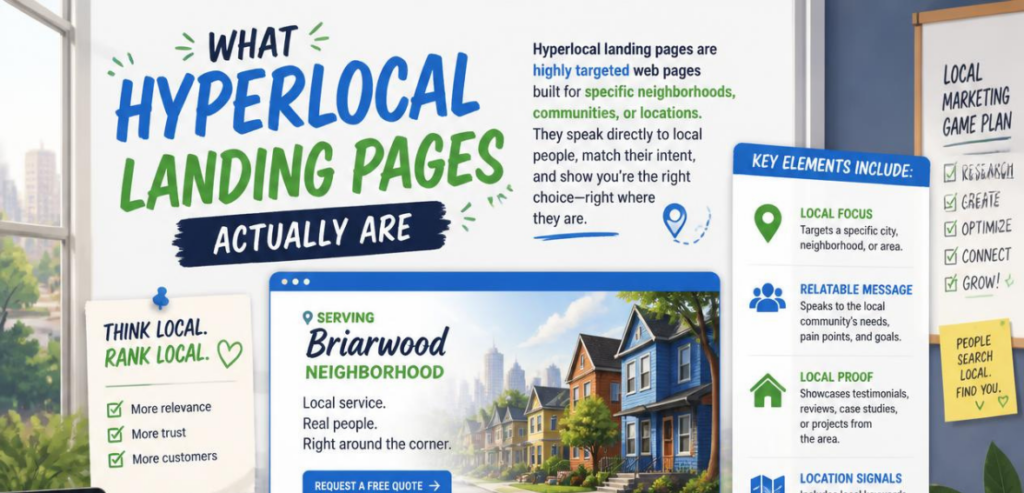
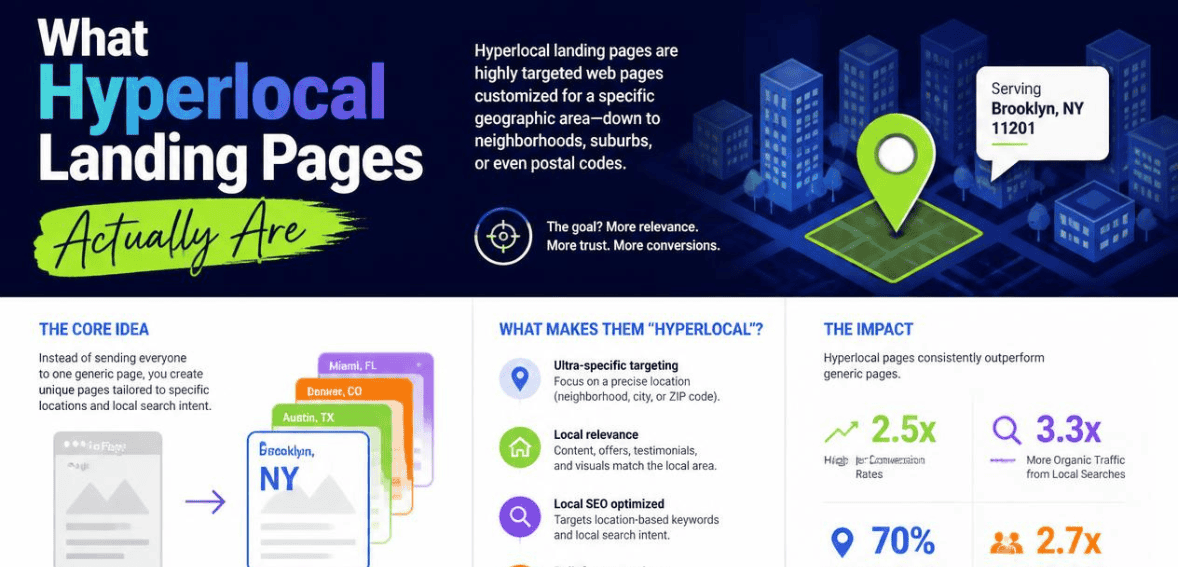
A hyperlocal landing page is a page built for one specific service area. That could be a city, a suburb, or even a single zip code. The goal is simple. Someone searches “roof repair in Plano” and lands on a page that speaks directly to Plano, not a generic page about roofing in general.
This idea is attractive to service businesses because they know local search is where the profit is. Home services, legal practices, dental services, HVAC … all highly competitive markets rely on “near me” search. A well-crafted local page can win a position in the local map pack as well as in the organic search results. The trouble really begins when businesses begin to shortcut this idea in an attempt to scale quickly.
Why Google Keeps Flagging Location Pages as Doorway Pages
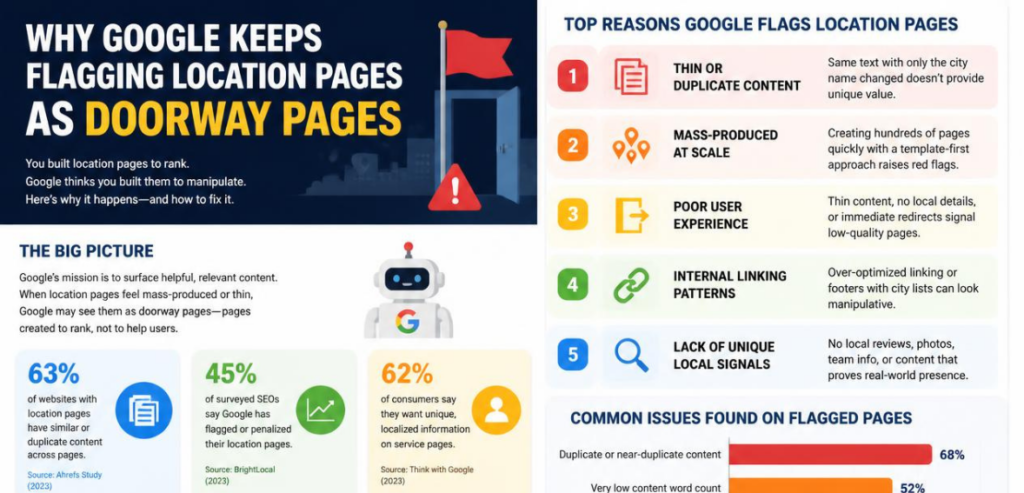
In 2015, Google set out to eliminate doorway pages by introducing a new ranking adjustment. In that post, Google stated that doorway pages worsen the search experience. For example, a searcher could click on many different result links, but still be taken to the same site, with the same low-quality content (Google Search Central Blog).
Google has been refining this policy ever since. Google’s current policy on spam is to classify doorway pages as pages that lead users to a low-value, intermediate page instead of the actual page that fulfills the user’s search query. This policy mentions companies that create a large number of web pages for different locations with only slight variations to attract more search traffic with no additional value to the user (Google Search Central spam policies).
This is exactly why so many local service sites get hit during core updates. A regional HVAC company might build one page per suburb, but if ninety percent of the text is identical across every page, Google’s systems read that pattern quickly. The location name changes. Nothing else does. That is the signature of a doorway page, even when the business never intended to spam anyone.
Landing Pages vs. Doorway Pages: The Real Difference
The line between these two page types is not about the URL structure or even the keyword. It comes down to intent and value. A landing page exists to help a real visitor take a real action, whether that is booking a service, requesting a quote, or calling a local office. A doorway page exists mainly to rank, and the content underneath that ranking goal is thin or repeated.
Before this page goes live, ask one honest question about it: would you be able to justify this page if there were no search engines? If the answer is no, and the only reason to have the page is because of another variation of a keyword, that page is edging into doorway page territory. On the other hand, if the answer is yes, because it really serves the customer in that particular location by providing costs, availability, and evidence that the business is operational in that area, that would be a legitimate hyperlocal landing page.
The Template: Building a Hyperlocal Page That Passes the Doorway Test
A page that survives algorithm updates needs real local substance layered on top of a consistent structure. Below is a practical framework that service businesses can reuse for every city or neighborhood they serve, without falling into the copy-paste trap.
Start With a Local Hook, Not a Generic Intro
Open the page with something specific to that town. Mention a neighborhood, a well-known road, a local landmark, or a common issue tied to that area’s climate or housing stock. A roofing company in a coastal town might mention salt air and storm damage. A roofing company in a colder region might mention ice dams. This single change already separates the page from a template.
Add Location-Specific Proof
Most businesses tend to skip this section, but this is what actually drives rankings. Add a few of your recent jobs completed in the area, a brief local case study, or project photos from that area. Add the reviews that mention the city name. A page with three authentic local reviews and one recent job will always outperform a page with generic five-star reviews that fit anywhere.
Localize the Service Details
List the specific services offered in that area, along with anything unique to local regulations, permits, or seasonal demand. A pest control page for a humid Gulf Coast town should read differently than one for a dry inland city, because the pests, the timing, and the customer concerns are genuinely different. This is where a paragraph approach works better than a repeated bullet list, since it forces real writing instead of a copied template.
Include a Clear, Location-Aware Call to Action
Every page needs a next step. Phone number for that specific branch if one exists, a form pre-filled with the service area, or a scheduling widget tied to that region’s availability. Vague calls to action like “contact us” perform worse than specific ones like “get a same-day quote for [city] homeowners.”
Link the Page Into a Real Site Structure
Doorway pages often exist on islands that are hard to find through normal navigation. You can easily avoid this by linking every city page to a proper service area hub, from the main navigation, or from a locations page that is actually browsable by visitors. This one structural fix addresses one of the biggest doorway page red flags that Google looks for.
How to Audit Location Pages You Already Have
Many service businesses already have a stack of city pages built years ago, before anyone worried about doorway penalties. Auditing that stack is faster than most people expect, and a couple of accessible tools make the process manageable.
Google Search Console
With Google Search Console, you can see which pages get impressions but almost no clicks. You can also see which pages have been entirely removed from the index. A city page that has consistent impressions and almost no engagement for several months likely shows either thin or duplicate content, even if no manual penalty has ever been applied to that page. For many users, sorting that data by clicks and impressions will be one of the quickest ways to locate pages with issues.
Screaming Frog
Screaming Frog crawls an entire site and exports every title tag, meta description, and word count in one pass. Running a crawl and sorting city pages by word count or by near-duplicate title tags will usually surface the exact cluster of pages that were built with a copy-paste template. Once that cluster is visible, it becomes much easier to decide which pages deserve real investment and which ones should be merged or removed.
Common Mistakes Service Businesses Make with City Pages
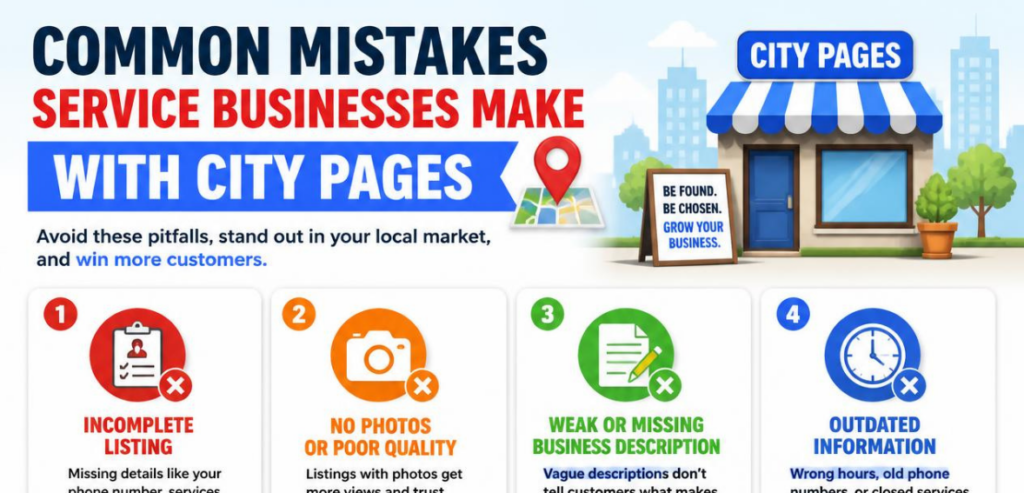
The primary mistake is lack of uniqueness. A business aiming to rank in every town in a hundred-mile radius launches thirty pages in a week. Because none of the pages have unique proof, unique images, or unique text, none of the pages can be expected to rank or convert. Another mistake is to hide the pages in a way that they are disconnected from the rest of the site. This creates “island” pages, which is a doorway page violation of Google’s guidelines. A third mistake is creating separate pages for each suburb when stronger and more complete content could incorporate several towns.
How Many Location Pages Should You Actually Build
There is no formal limit, but the optimal strategy generally favors depth over breadth. A business with authentic technicians, real jobs, and legitimate reviews in five to six towns will gain more long-term benefits from five to six comprehensive pages than thirty insubstantial pages. As the business expands to new locations, new pages with local evidence can be created one by one, as opposed to creating numerous pages at once. Also, Google’s instructions on local listings and service area businesses in the Google Business Profile clearly support this. They encourage businesses to accurately reflect the real service area they cover, as opposed to creating a page for every conceivable search query (Google Business Profile Help).
Conclusion
Hyperlocal landing pages are not risky by nature. Copy-paste city pages are risky, because they exist only to rank, not to help anyone. The businesses that win local search over the long run are the ones that treat each city page like a small, honest sales page for that specific town, filled with real proof, real service details, and a clear next step. Start with the towns where the business already has strong results, write those pages properly, link them into normal site navigation, and expand slowly. That approach will always outlast a quick doorway shortcut, and it will keep the pages safe through the next core update rather than exposed to it.
Frequently Asked Questions
Are location pages always considered doorway pages by Google?
No. Google’s own spam policies focus on intent and duplication, not on the existence of location pages themselves. A city page with unique content, real local proof, and normal site navigation is treated as a legitimate landing page, not a doorway page.
How much content needs to be unique on each city page to avoid a doorway penalty?
There is no official word count Google publishes, but the safest approach is to make sure the local proof, the specific service details, and the opening hook are genuinely different on every page. If two city pages read the same with only the city name swapped, that pattern is a clear risk regardless of overall length.
Should service businesses build a separate page for every small suburb they serve?
Usually not. It is often stronger to build one well-developed page for a primary service area and mention nearby suburbs naturally within that content, rather than creating a thin page for every small town nearby.
What is the fastest way to tell if an existing page has slipped into doorway territory?
Place two city pages side by side. If most of the content is identical and only the location name changes, that page is likely drifting into doorway territory and is a strong candidate for consolidation or a rewrite.Picture this. A plumber in Ohio builds forty city pages in one weekend. Same photo. Same three paragraphs. Only the city name changes. Three months later, every one of those pages is gone from Google. Not penalized in some dramatic public way. Just quietly buried.
This occurs with HVAC & plumbing businesses every day. Everyone wants to rank in every town that they serve. The HVAC & plumbing business copies and pastes the same page, then swaps the city name. Google calls this doorway abuse, customers find this annoying, and it rarely works for long.
The good news is that hyperlocal landing pages are not the problem. The problem is thin, duplicate, copy-paste pages. A hyperlocal page done the right way will rank, convert, and establish trust in a specific town or neighborhood. This guide will explain how to create hyperlocal pages done the right way to appear to be a legitimate local resource as opposed to a spam template that substitutes city names.
What Hyperlocal Landing Pages Actually Are
A hyperlocal landing page is a page built for one specific service area. That could be a city, a suburb, or even a single zip code. The goal is simple. Someone searches “roof repair in Plano” and lands on a page that speaks directly to Plano, not a generic page about roofing in general.
This idea is attractive to service businesses because they know local search is where the profit is. Home services, legal practices, dental services, HVAC … all highly competitive markets rely on “near me” search. A well-crafted local page can win a position in the local map pack as well as in the organic search results. The trouble really begins when businesses begin to shortcut this idea in an attempt to scale quickly.
Why Google Keeps Flagging Location Pages as Doorway Pages
In 2015, Google set out to eliminate doorway pages by introducing a new ranking adjustment. In that post, Google stated that doorway pages worsen the search experience. For example, a searcher could click on many different result links, but still be taken to the same site, with the same low-quality content (Google Search Central Blog).
Google has been refining this policy ever since. Google’s current policy on spam is to classify doorway pages as pages that lead users to a low-value, intermediate page instead of the actual page that fulfills the user’s search query. This policy mentions companies that create a large number of web pages for different locations with only slight variations to attract more search traffic with no additional value to the user (Google Search Central spam policies).
This is exactly why so many local service sites get hit during core updates. A regional HVAC company might build one page per suburb, but if ninety percent of the text is identical across every page, Google’s systems read that pattern quickly. The location name changes. Nothing else does. That is the signature of a doorway page, even when the business never intended to spam anyone.
Landing Pages vs. Doorway Pages: The Real Difference
The line between these two page types is not about the URL structure or even the keyword. It comes down to intent and value. A landing page exists to help a real visitor take a real action, whether that is booking a service, requesting a quote, or calling a local office. A doorway page exists mainly to rank, and the content underneath that ranking goal is thin or repeated.
Before this page goes live, ask one honest question about it: would you be able to justify this page if there were no search engines? If the answer is no, and the only reason to have the page is because of another variation of a keyword, that page is edging into doorway page territory. On the other hand, if the answer is yes, because it really serves the customer in that particular location by providing costs, availability, and evidence that the business is operational in that area, that would be a legitimate hyperlocal landing page.
The Template: Building a Hyperlocal Page That Passes the Doorway Test
A page that survives algorithm updates needs real local substance layered on top of a consistent structure. Below is a practical framework that service businesses can reuse for every city or neighborhood they serve, without falling into the copy-paste trap.
Start With a Local Hook, Not a Generic Intro
Open the page with something specific to that town. Mention a neighborhood, a well-known road, a local landmark, or a common issue tied to that area’s climate or housing stock. A roofing company in a coastal town might mention salt air and storm damage. A roofing company in a colder region might mention ice dams. This single change already separates the page from a template.
Add Location-Specific Proof
Most businesses tend to skip this section, but this is what actually drives rankings. Add a few of your recent jobs completed in the area, a brief local case study, or project photos from that area. Add the reviews that mention the city name. A page with three authentic local reviews and one recent job will always outperform a page with generic five-star reviews that fit anywhere.
Localize the Service Details
List the specific services offered in that area, along with anything unique to local regulations, permits, or seasonal demand. A pest control page for a humid Gulf Coast town should read differently than one for a dry inland city, because the pests, the timing, and the customer concerns are genuinely different. This is where a paragraph approach works better than a repeated bullet list, since it forces real writing instead of a copied template.
Include a Clear, Location-Aware Call to Action
Every page needs a next step. Phone number for that specific branch if one exists, a form pre-filled with the service area, or a scheduling widget tied to that region’s availability. Vague calls to action like “contact us” perform worse than specific ones like “get a same-day quote for [city] homeowners.”
Link the Page Into a Real Site Structure
Doorway pages often exist on islands that are hard to find through normal navigation. You can easily avoid this by linking every city page to a proper service area hub, from the main navigation, or from a locations page that is actually browsable by visitors. This one structural fix addresses one of the biggest doorway page red flags that Google looks for.
How to Audit Location Pages You Already Have
Many service businesses already have a stack of city pages built years ago, before anyone worried about doorway penalties. Auditing that stack is faster than most people expect, and a couple of accessible tools make the process manageable.
Google Search Console
With Google Search Console, you can see which pages get impressions but almost no clicks. You can also see which pages have been entirely removed from the index. A city page that has consistent impressions and almost no engagement for several months likely shows either thin or duplicate content, even if no manual penalty has ever been applied to that page. For many users, sorting that data by clicks and impressions will be one of the quickest ways to locate pages with issues.
Screaming Frog
Screaming Frog crawls an entire site and exports every title tag, meta description, and word count in one pass. Running a crawl and sorting city pages by word count or by near-duplicate title tags will usually surface the exact cluster of pages that were built with a copy-paste template. Once that cluster is visible, it becomes much easier to decide which pages deserve real investment and which ones should be merged or removed.
Common Mistakes Service Businesses Make with City Pages
The primary mistake is lack of uniqueness. A business aiming to rank in every town in a hundred-mile radius launches thirty pages in a week. Because none of the pages have unique proof, unique images, or unique text, none of the pages can be expected to rank or convert. Another mistake is to hide the pages in a way that they are disconnected from the rest of the site. This creates “island” pages, which is a doorway page violation of Google’s guidelines. A third mistake is creating separate pages for each suburb when stronger and more complete content could incorporate several towns.
How Many Location Pages Should You Actually Build
There is no formal limit, but the optimal strategy generally favors depth over breadth. A business with authentic technicians, real jobs, and legitimate reviews in five to six towns will gain more long-term benefits from five to six comprehensive pages than thirty insubstantial pages. As the business expands to new locations, new pages with local evidence can be created one by one, as opposed to creating numerous pages at once. Also, Google’s instructions on local listings and service area businesses in the Google Business Profile clearly support this. They encourage businesses to accurately reflect the real service area they cover, as opposed to creating a page for every conceivable search query (Google Business Profile Help).
Conclusion
Hyperlocal landing pages are not risky by nature. Copy-paste city pages are risky, because they exist only to rank, not to help anyone. The businesses that win local search over the long run are the ones that treat each city page like a small, honest sales page for that specific town, filled with real proof, real service details, and a clear next step. Start with the towns where the business already has strong results, write those pages properly, link them into normal site navigation, and expand slowly. That approach will always outlast a quick doorway shortcut, and it will keep the pages safe through the next core update rather than exposed to it.
Frequently Asked Questions
Are location pages always considered doorway pages by Google?
No. Google’s own spam policies focus on intent and duplication, not on the existence of location pages themselves. A city page with unique content, real local proof, and normal site navigation is treated as a legitimate landing page, not a doorway page.
How much content needs to be unique on each city page to avoid a doorway penalty?
Are location pages always considered doorway pages by Google?
No. Google’s own spam policies focus on intent and duplication, not on the existence of location pages themselves. A city page with unique content, real local proof, and normal site navigation is treated as a legitimate landing page, not a doorway page.
Should service businesses build a separate page for every small suburb they serve?
Usually not. It is often stronger to build one well-developed page for a primary service area and mention nearby suburbs naturally within that content, rather than creating a thin page for every small town nearby.
What is the fastest way to tell if an existing page has slipped into doorway territory?
Place two city pages side by side. If most of the content is identical and only the location name changes, that page is likely drifting into doorway territory and is a strong candidate for consolidation or a rewrite.